Here you’ll find an overview of how support cases are handled at Antura and how to get the help you need. As a designated contact person, you also have direct access to the support portal, where you can easily register, track, and manage your organization’s support cases.
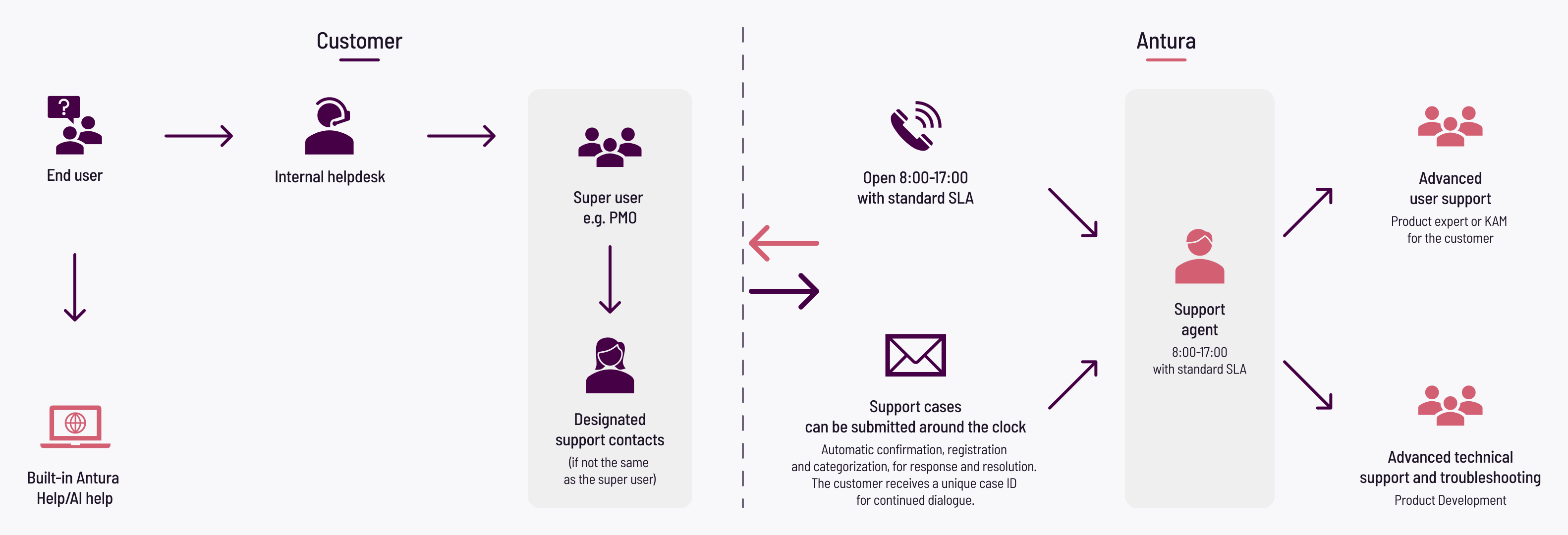
As an end user, your first point of contact is your internal helpdesk, or you can use the built-in help and AI features in Antura. If needed, the case is escalated to your designated support contacts or superusers, who submit a support case to Antura.
Support cases can be submitted 24/7, year-round, and are automatically acknowledged with a case ID. Cases are handled during business hours in accordance with the SLA. When needed, advanced support is involved, such as your Antura account manager (KAM), technical experts, or product development.
As a designated contact person for your organization, the support portal gives you direct access to Antura Support and makes it easy to manage your support cases. Everything is available in one place, giving you a clear overview.
Here you can:
Please note that only designated contact persons have access to and can log in to the support portal.