Roadmap is a completely new view that will be launched in the March 2026 version of Antura. The view is a portfolio-level view and is located here: Portfolio – Roadmap.
.docx%20-%20Word.png)
In the Roadmap view, completely new opportunities are created to overview schedules in projects and compare them against each other. The roadmap replaces the previous portfolio-level Gantt view and takes the functionality much further. Just like in the previous Gantt view, decision points and milestones and the status of the WBS elements are shown, but there are also opportunities to look at selected milestones, or even activities in the projects' schedules.
In the Roadmap there are two types of filtering, project and task. The classic project filter controls which projects are shown in the view, the task filter controls which WBS elements (decision points, milestones, tasks) are displayed. This creates powerful opportunities. Since the view can show WBS elements and filter among these, it is possible, in combination with task properties, to make visualizations that were not possible before. See help files for full details, but some examples may include:
.docx%20-%20Word.png)
The view can plot external dependencies between projects. In the view, the user can choose whether only to see the projects that have external dependencies or not. All to make it possible to focus on what is interesting for the task at hand. External dependencies are plotted in the graphic when both the source and target project are expanded.
.docx%20-%20Word.png)
In the Roadmap view, there are many settings to achieve what you want to see.
Another area that also has new functionality is printing. The print now uses the browser's print functions and allows them to adjust both scale, orientation and paper size. It’s possible to print a large timetable on A3 sized paper if desired.
.docx%20-%20Word.png)
With the March 2026 release, support for file name length will be expanded to 255 characters (from 100 previously). Antura previously handled unlimited paths but each folder and file could only have 100 characters. This change matches all modern operating systems.
In theMarch 2026 version, an extension will be made to an API that is part of theAntura Open API. The change means that the response from the API has gained anadditional value and may affect existing integrations.
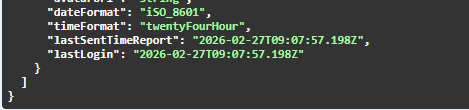
Theendpoints /app/api/v1/usersand /app/api/v1/users/id have been extended with the"lastLogin" field that returns the time of the user's last login. Theinformation is also updated in the Swagger API documentation.
In theMarch 2026 version of Antura, we change the default value for cost input whencreating a task in the schedule to be "off".
In practice, the change means that when a task is created in the schedule, it does not automatically appear in the cost view, but the task must be"activated" for cost entry. Just as before, the task is activated forcost input automatically if, for example, there is resource entry on the taskor if there is a cost through some form of integration. The change is made as it has been perceived as unnecessary to have to "deselect" activities for cost entry that are only to be used for time planning.
In theMarch 2026 version of Antura, we are also making a graphical upgrade of themodels for the add-on products Antura for PPS and Antura for XLPM. This is togive them a more modern look and that they better reflect the graphic profileof each supplier.
.docx%20-%20Word.png)
.docx%20-%20Word.png)
No changes.
No changes.